

Recommended Git Config


In order to optimize my git workflow, specifically for GitHub, I present you with some configs and tricks that I set up.
Since I like to keep my commit history linear, I personally prefer to rebase instead of merge when I pull new changes from the remote repository. This means that if I run git pull, it will not perform a fetch and merge but rather a fetch followed by a rebase, which results in my local commits being automatically included on top of the remote commits coming in. That way, I avoid having merge commits that would IMHO pollute the history.
If you want to try this out yourself, use the --rebase parameter on pull like that:
git pull --rebaseIf you feel happy with this workflow, you can set it in your global config, so you don’t need to include the --rebase option anymore:
git config --global pull.rebase trueBy default, git often initializes new repositories with master as the primary branch. However, most modern platforms (especially GitHub) have moved towards using main. Instead of renaming your branch every time you run git init, you can tell git to use main globally by default:
git config --global init.defaultBranch mainI really like to credit people who contributed in any way to my commits. What I find annoying, however, is that you have to know the GitHub email address of the user you want to Co-author. I used to go to the people’s profile, search for a recent commit they made and appending .patch to the GitHub commit URL. In the diff that you get this way, you can manually extract the email of the user. But why should I manually do this 1min work if I could spend 10h automating it?

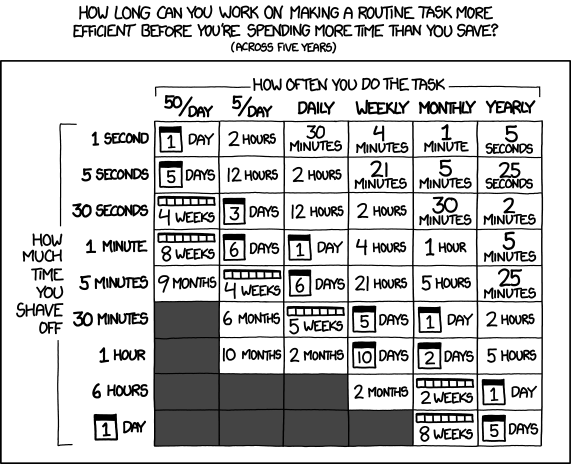
Sorry, I just had to include those two legendary xkcds in here.
So I created a little bash script which simplifies adding Co-authors to your commits. All you need is gh and jq installed, and the little bash script below.
brew install gh jqsudo apt install gh jqSave this bash script as git-ucommit to a folder that is in your $PATH (like ~/bin or /usr/local/bin) and make it executable with chmod +x ~/bin/git-ucommit:
#!/usr/bin/env bash
# Check for dependenciesif ! command -v gh &> /dev/null || ! command -v jq &> /dev/null; then    echo "Error: 'gh' (GitHub CLI) and 'jq' are required."    exit 1fi
args=()usernames=()message=""
# Parse argumentswhile [[ $# -gt 0 ]]; do  case "$1" in    -u|--user)      usernames+=("$2")      shift 2      ;;    -m|--message)      message="$2"      shift 2      ;;    *)      args+=("$1")      shift      ;;  esacdone
trailer_args=()
# Resolve GitHub usernames to Co-authored-by trailersfor user in "${usernames[@]}"; do  user_json=$(gh api users/"$user" 2>/dev/null)  if [[ $? -ne 0 ]]; then    echo "Warning: Could not find GitHub user '$user'. Skipping."    continue  fi
  name=$(echo "$user_json" | jq -r '.name // .login')  id=$(echo "$user_json" | jq -r '.id')  email="$id+$user@users.noreply.github.com"
  trailer_args+=(--trailer "Co-authored-by: $name <$email>")done
# Execute the commitif [[ -n "$message" ]]; then  final_msg=$(echo -e "$message" | git interpret-trailers "${trailer_args[@]}")  git commit "${args[@]}" -m "$final_msg"else  # No -m flag? Inject trailers and open the editor  git commit "${args[@]}" "${trailer_args[@]}" -efi
Since the file name starts with git-, you do not even need to create a git alias, as it is smart enough to detect your executable and just allows you run:
git ucommit -m "fix: suggestions" -u trueberryless -u delucisI myself integrated this functionality into my  nix-darwin setup. Check out my Nix module if you can profit from this setup.
🔄 Automatic Rebase on Pull
git config --global pull.rebase trueSets your global configuration to perform a rebase instead of a merge when pulling. This keeps your git history linear and avoids unnecessary merge commits.
🌱 Modern Default Branch
git config --global init.defaultBranch mainEnsures every new local repository you initialize starts with
maininstead ofmaster, aligning your local environment with GitHub’s defaults.
👥 Simplified Co-Authoring
git ucommit -m "message" -u <username>Uses a custom bash script alongside
ghandjqto automatically resolve GitHub usernames to the correct “Co-authored-by” trailers, saving you from manual email lookups.
Here are some helpful resources for optimizing your Git and GitHub workflow:
- GitHub CLI (gh) Documentation
- Creating a commit with multiple authors
- Git Interpret Trailers Documentation
That’s it! With these tweaks, your local environment stays modern, your history stays clean, and giving credit to your collaborators becomes a breeze. Happy coding!